



Most people struggle with the same challenges at work every day: it's hard to work with colleagues because they don't read our emails, we have to work a lot of overtime, they often interrupt us while we're working... Nowadays, however, we can even personally see what prevents us from working effectively, and what methods and tricks we can use to increase our own efficiency.
In addition to making the most popular Office applications, such as Outlook, Word, Excel, PowerPoint, available even from a browser, Office 365 also provides many other services that make it easier for us to communicate, communicate with our colleagues, manage projects, automate processes, and much more. And the fact that these services are all connected to each other in the background brings many additional benefits.
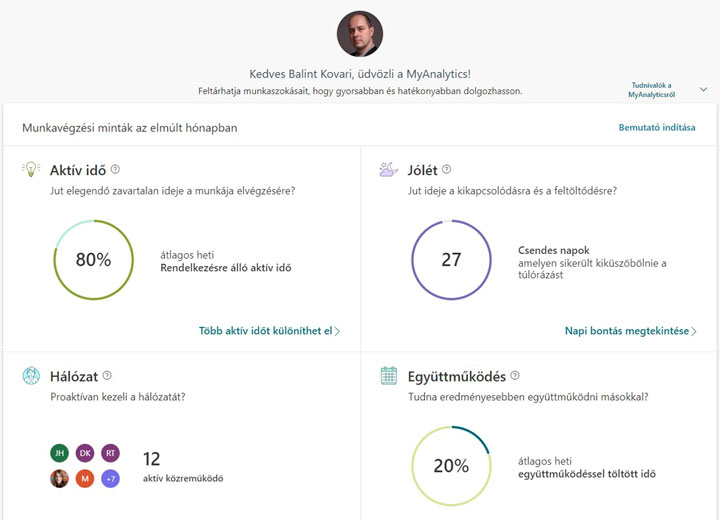
If you use Microsoft's cloud-based business productivity service, Office 365 , you can learn interesting things about your work habits, for example, with the help of Microsoft's MyAnalytics service. This application does nothing more than collect data on the use of various Microsoft software and services and presents them to us in the form of various reports. From these, we can find out how much overtime is worked, how much time is spent processing emails or in meetings. It is worth looking at these numbers from time to time, because they can greatly help your work efficiency.
Help with time management
Everyone has 8 hours a day, so it's important to know how to use them. It's impossible to focus if people are constantly asking you questions. MyAnalytics' report shows how much time you were able to work during the week without having a meeting, opening an email, or responding to anyone. If the number of these hours is high enough, it means that you're managing your time well and working with few unnecessary interruptions. For example, it can easily turn out that because you're constantly opening and answering every email that comes in, it's impossible to focus, and this can be detrimental to your productivity. If you recognize this, it's easier to find a solution, such as consciously setting aside periods of time each day when you don't touch Outlook (as tempting as it may be).
Are every meeting important?
In Myanalytics, we can also see exactly how much time we spend on emails during our meetings. If this number is high, it either means that we are attending meetings where there is nothing to gain because we do not need to pay attention, or that these meetings are not productive because everyone is busy with emails in the meantime.
Effective emailing
We all have a colleague who even writes an email when it arrives at the office. It is worth suggesting to such colleagues that they check in the system how many people read their letters. If we prioritize our letters properly, then their opening rate should be above 95%, but if someone does not choose properly when to write a letter and when it is completely unnecessary, then this can easily drop below 70%. Feedback can also come in handy when we want to check whether everyone among the recipients has opened an invitation or information we have sent. If not, then we have the opportunity to contact the person(s) personally, or perhaps inform them again in another email.
These features may seem like a curiosity at first, but if we achieve just one hour more focused work by keeping these numbers in mind, that's exactly one hour more that we can spend on ourselves instead of unnecessary overtime.
If you would like to learn more about Office 365 services, visit one of our Office 365 training courses.